
During the process of data acquisition using the device, the computer’s memory configuration directly affects system performance, scan frame rates, and overall acquisition speed. To ensure stable and efficient scanning, it is recommended that customers pay close attention to the memory channel mode, capacity, and speed when configuring their computers.
1. Why Emphasize “Dual-Channel Memory”?
Dual-channel memory refers to a system using two memory modules simultaneously for parallel data transfer, which significantly increases memory bandwidth. If the system uses a single channel or a memory speed lower than 3200 MT/s, it can greatly impact the scanning process—reducing scan frame rates and slowing down data acquisition.
Example computer configuration:
- 2×8GB indicates two 8GB memory modules
- This is a dual-channel 16GB configuration
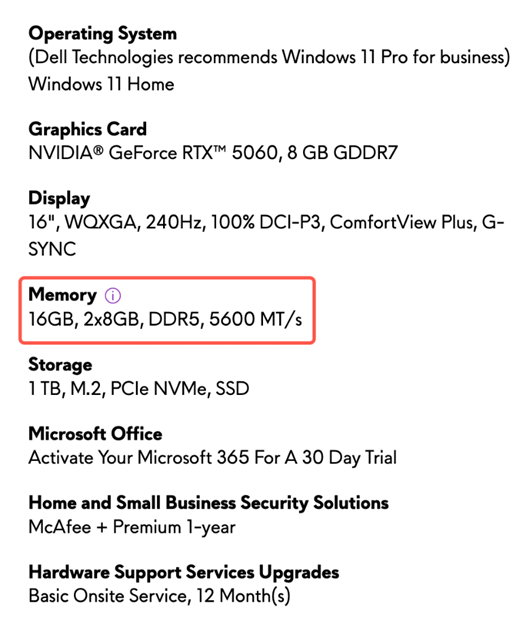
Tips: We also recommend using 32GB.
2. How to Check Your Computer’s Memory Configuration?
- Right-click on the taskbar and select Task Manager
- Click Performance → Memory
- At the bottom right, you can see the speed and channel mode of your memory
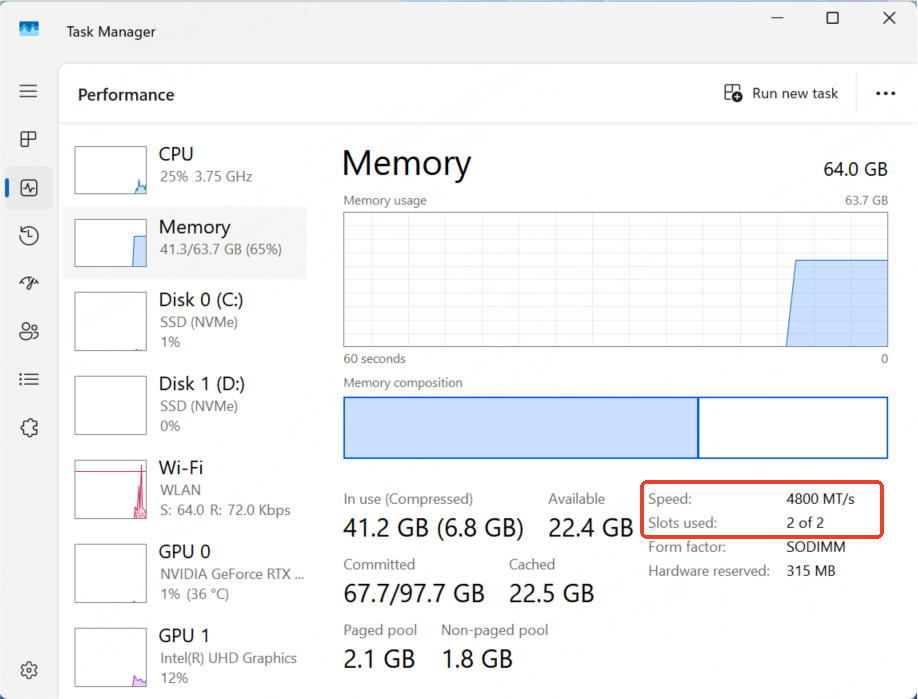
This method allows you to quickly confirm whether your computer is using dual-channel memory and whether the memory speed meets requirements.
3. Memory Configuration Recommendations
To ensure optimal performance and stability of the scanning system, the recommended memory configuration is:
- Channel mode: Dual-channel
- Capacity: 32GB or higher
- Speed: 4800 MT/s or higher
Configurations to avoid:
- Single-channel memory
- Memory speed below 3200 MT/s
Please note: All devices have identical configurations. (Intraoral scanner, Metismile, and desktop scanner)